Wednesday, 27 November 2013
Call for gender, mobile and learning research cases ideas
Tuesday, 10 September 2013
Can the #MOOC format respond to the educational challenges #altc2013?
If you want to you can join us at 11.45 on Tuesday 10 September 2013 in session 342, right after the keynotes. For a full time schedule, look here.
My input will be around MOOC and how or if they can be an answer to moments of crisis. But looking for your ideas on the subject, so please share. For those wanting to download the opinion paper I have added below, you can download it here at academia.edu. The references mentioned below are also all gathered in the academia link. I wrote this piece months ago, and I put it in my drawer of "when-I-have-time", but I feel it does have something going for it.
ProblemIn the educational reality of the second decennium of the 21st century education is molded by a variety of new factors. The learning and teaching processes of today are impacted by the use of social media, new mobile technologies and pedagogical formats. Due to these new technologies and emerging formats, education is forced into a process of transformation. In addition to these new strains on education, the old challenges with regard to excluded, vulnerable learner groups keep on existing, in fact they are in some cases becoming more urgent.
Theory focusing on some of the contemporary tensions in contemporary education
Local versus global: termed by Wellman (2002) as glocalization in relation to the overlapping spheres of society, technology , and the World Wide Web. This glocalization of education can simultaneously serve to perpetuate the status quo of existing power relations form one region to the next, as mentioned by Willems and Bossu (2012, p. 186).
Digital and Social exclusion(s): one area of social exclusion in the technological era relates to the digital divide. However, this term gathers many factors. There are “multiple divides which relate to a variety of factors such as: age; gender; ‘ethnic clustering’; uncertainty of financial conditions; work insecurity; and social insecurity” (Mancinelli, 2007, p. 7). Looking at this wide array of factors, Willems and Bossu (2012) suggested that the focus to address these educational challenges should be “on social inclusion rather than simply on the digital divide” (p. 188).
Increasing diversity of the learner group: Non-participation in adult and lifelong learning is deeply entrenched in ‘trajectories’ based on class, gender, generation, ethnicity and geography, which are established at an early age (Tuckett & Aldridge, 2009).
North – South, postcolonial tensions. Education in society always reflects the values of the dominant political ideology which in the West is that of neoliberalism (Apple, 2006). This ideology of free market economics, constant consumerism and individualism is inevitably reproduced in schools. Viruru (2005) adds that dominant ideologies of how children and youth grow and develop have become another of colonialism’s truths that permit no questioning, for the dominant educational model is seen as ‘the right one’. This post-colonial tensions are also increased by some xMOOC courses that are currently promoted as providers of “education for all”, but in fact are a new form of the post-colonial push of the North/West, as suggested by
Individual learning versus networked learning: Downes (2007) stated that “knowledge is distributed across a network of connections, and therefore that learning consists of the ability to construct and traverse those networks.” As such, a successful, connected/networked pedagogy would “seek to describe the practices that lead to such networks, both in the individual and in society.”
Closed versus Open Educational Resources (OER): OER can, and do include full courses, textbooks, streaming videos, exams, software, and any other materials or techniques supporting learning (OER Foundation, 2011, p. 1). But what is shared builds upon the content and ideas of its makers. And what people think others need, is not always that content which is really needed.
Technology and infrastructure: McGill (2010) noticed that in order to make all the OERs or any educational materials and courses fully open and accessible materials will be accessible on alternative technologies [including] mobile [technologies]. Willems and Bossu (2012) added that “the development of OER for mobile learning applications may be a more appropriate strategy to make OER widely available to students in developing regions (p. 193).
Digital identity: Identity negotiation and its relationship to societal power and status relations is also clearly implicated in the phenomenon of “stereotype threat” for which there is extensive experimental documentation (OECD, 2010, pp. 87-88). This research is summarized by Schofield and Bangs (2006) as follows: “stereotype threat, the threat of being judged and found wanting based on negative stereotypes related to one’s social category membership, can seriously undercut the achievement of immigrant and minority students” (p. 93). Additionally, the risk of providing content for the masses, is that identities get lost and that only the societal, predominant identity is represented in both the texts, as in the visual material of the course content. This has a profound effect on learning, as identification is connected to motivation and learning.
Global communication needs versus language barriers: the Council of Europe has consistently promoted the value of plurilingualism for all students (including migrant and vulnerable students) (Little, 2010). However most international courses are English spoken/written.
What can we do?Get together and build an answer that at least addresses some of the above issues.
Additionally, there is one human factor that is now more than ever possible across borders, beliefs, cultures and time, that is dialogue. Communication, or dialogue, and living through experiences in a collaborative way is also central to a MOOC. As a MOOC is a gathering of people with generally no prior connection, it has a unique social advantage that relates to a more open and connected way of thinking (de Waard, I., Gallagher, M. S., Hogue, R., Ă–zdamar Keskin, N., Koutropolous, A., Rodriguez, O.C., Abajian, S.C., 2011). This also coincides with what Downes (2007) wrote on that the learning activities we undertake when we conduct practices in order to learn are more like growing or developing ourselves and our society in certain (connected) ways. “To stay viable, open systems maintain a state of non-equilibrium… they participate in an open exchange with their world, using what is there for their own growth … that disequilibrium is the necessary condition for a system’s growth” (Wheatley, 1999, p. 78-79). This constant flux, with attention to context and personal experiences/backgrounds can be an inherent part of a MOOC, but that is only possible if we consciously embed these options in any MOOCs that are build. In order to ensure this type of tailored MOOC it is my understanding that all should be involved in building MOOCs, their design, content, approaches, pedagogies, awards/badges/certification.
It is the author’s believe that the Massive Open Online Course format or MOOC has the potential to address many of the above mentioned issues if the format is tweaked to do so. MOOCs have only emerged during the last 5 years, the format is now mature enough to be optimized for the challenges that we all – as global learners/teachers/researchers – are facing during these times of financial and educational crisis. It is also the time to provide alternatives to the more power duplicating MOOC that are sometimes rolled out.
The expertise of the moderators of this workshop is multi-faceted with the goal of being able to embed multiple optimizing factors into the adapted MOOC design to come out of the workshop. To address a multitude of factors, it is important to collaboratively design solutions based upon interdisciplinary expertise with a common goal.
Monday, 2 September 2013
Preparing for debate Alt-C online education in times of crisis
For those joining Alt-C conference which is held in Nottingham, UK this year, feel free to join us on Tuesday 10 September at the TEL at 11.45 for the discussion on Technology Enhanced Learning Crisis. Panel people: Richard Hall, Debbie Holley, Sarah Stager, Karl Royle, Helen Beetham, John Traxler and myself. Will be fun and passionate debate.
Tuesday, 16 October 2012
#mLearn12 on #augmented reality with Elizabeth Fitzgerald
Elizabeth Fitzgerald from Open University UK gives an overview of augmented learning state of the art. She looks fine as always and you can feel her passion for research as she gives her presentation.
What is AR
making the learning experience of a place more meaningful
current uses of AR
sports coverage
retail/marketing
networking (augmentedU) or find somein in a crowd
aviation (head-up displays on wndscreen of plane)
training or task support
navigation
sightseeing e.g. outdour venues, museums and art galleries
defining technology-enhanced realities: virtual, mixed and augmented
fusion of digital information in real environment
AR, situated learning and embodiment
Situated learning
authentic: contextualized
use of tools to mediate contact with the world
Embodiment and embodied cognition (physical interactions with world help us to creeate meaning
other related research
ecology of resources
reality -based interaction
space/place (Dourish)
Classifying AR based on 6 projects using AR for mLearning
Dimensions used:
devices or technology used
mode of interaction
method of sensory feedback to the user (visual/audio/text /video)
type of experience (personal or shared)
fixed/static or portable experience
learning activities or outcomes
Criticisms and limitations of AR
Technical challenges:
GPS accuracy and registration errors
varying signal quality of phone networks/WiFi coverage
battery life of devices
viewing the screen in bright sunlight
using devices in the rain
Pedagogical challenges
learning not necessarily driven by the pedagogy
novelty of the tech may detract from the experience
ensure learning is not altered to fit around the limitations of the device
tech might be more engaging that surrounding environment (is the student removed from the real world?)
consider first the learning goals and objectives
reduction in observation skills due to excessive reinforcing/scaffolding
Issue: how can we make any educational innovation sustainable?
Is it a matter of time? Maybe this is one step along the way to completely integrated sensors etcetera for looking at the world? Increased hapticness, audio... or will this risk information overload => maybe we need to curate the augmented environment.
Do we need a new theory of augmented place? see E. Fitzgerald (in press - oct/nov 2012) Towards a theory ....
The slideshare of her presentation can be viewed here
Thursday, 2 August 2012
Does #mobile learning really make a difference in this world?
Years ago I met Devaji Patil in Bangalore, India and … I related to his spirit and wisdom. Devaji is a philosopher at heart and a medical doctor by profession. In his new job he wants to set up mobile health projects, but at the same time he wants to make sure they will be durable and basically… make sense to the people it is designed to help. So he challenged me with some tough questions comprising ethics, meaningfulness, gender challenges and effectiveness of learning with mobiles. I could get some thoughts in, but I feel many more people are needed to answer his questions in full, so feel free to add ideas or send Devaji additional answers.
Thursday, 12 July 2012
How to choose a #mobile device for #mLearning purposes

Choosing the best (smart)phone or tablet for mobile learning can be quite a challenge. It also depends on what you want to do with it and how easy you can get used to technology. The amount of features you want to use will also allow you to purchase a low or high cost smartphone or mobile device.
Let's say you want to explore mobile learning, these are some of your options.
Smartphones
First of all if you are a tech savvy person you could go for a less expensive device which has all the options of the iPhone and more, for the iPhone costs a lot, yet is similar to many other mobile phones that are cheaper. The iPhone is above all an incredibly easy phone to use (very intuitive in its user interface), so for those not that comfortable with technology, the iPhone is the way to go (although it is expensive). If you do not want to pay the cost of an iPhone, you can also go for an iPod Touch, which is much cheaper and offers all the iPhone options (you can access the internet via a Wi-Fi connection), except phone possibilities (but the phone possibilities are not essential for mobile learning).
Tablets
The same is true for tablets (there is an increasing array of tablets out there, running on Apple (iPad) or Android (Samsung Galaxy tab) or .... Tablets have the advantage of having a bigger screen. As such they offer more visual options than the smartphones mentioned above.
Other
You can also simply use a MP3 player, as these will enable you to share audio material (e.g. language learning or gather all the songs of birds in the wood and determine which bird it is...) or an eBook reader for those more interested in reading materials.
What can you opt for in a high-end phone, tablet or mobile device?
When deciding on a phone, it is good to know what features are most important to you and what type of mLearning you are envisioning, e.g. if you want to use location data to tag your pictures for field trips or similar, GPS will be necessary.
Depending on these features you can make a selection of phones and then compare them in one of the review sites (or a couple of review sites, sometimes those sites already have a 'best off' list: http://reviews.cnet.com/best-cell-phones/ , or a funny geeky one: http://www.testfreaks.co.uk/mobile-phones/ ). In any case it is good to look at which devices are on your local market and then look at (and compare) the specifications of your short list of mobile devices you want to choose from. Go for sites that offer both expert reviews AND peer reviews, because it is the user that is important, not the geek.
Personal criteria that might influence your mobile device or tablet purchase (basically what you do is check what you feel is important to you, the more possibilities, the more your device will cost - most of the time):Camera quality: how many mega pixels does the camera have (the more mega pixels the better the quality of the pictures taken with it)? this was critical too me, as I like to record high quality movies and pictures for later recall (visual person). TV-connection option: if you want to use your mobile device to train a team, you might want to search for a mobile device that can be fitted onto a beamer or television set. That way your mobile device can be used as a media broadcast device (I like such a feature a lot, also enables me to share pictures and movies when visiting family).
Memory extension: if you use a lot of big files (movies, audio, podcasts...) it is a good thing to look at phones that have a memory slot (most of the time it is for mini SDcards), this offers you the chance to have access to more files.
WiFi possibility: if in doubt, I would certainly go for wifi enabled phones: wifi enables you to connect to free internet, which will save you a bundle especially when being abroad.
Bluetooth: this might be interesting if you want to connect to other devices without using a USB connectivity cable. It is also handy for health check-ups, they use bluetooth for instance for wireless interaction between a blood pressure meter and the software to analyse diabetes.
Phone capabilities and specifically quad band connectivity: only important if you travel internationally, because if you only have access to - say 2 - phone frequencies, you will likely not be able to access in some continents.
Mail access: is there a possibility to exchange between your mailbox and the mobile? Or is it of interest to you? If yes, look for that specification.
In addition to that one: synchronisation with outlook: only necessary if you work with outlook, this enables you to exchange mail and your contacts between your desktop and mobile phone.
Office possibilities: this enables you to look at office documents (depends again on your need).
Social media widgets: does the device offer easy to install social media widgets (e.g. facebook, flickr, twitter...). Having this function will enable you to quickly personalize your phone to your own social network.
GPS: that is increasingly important for geo-located learning as well, in those cases the GPS will know where you are at and offer you nearby information (shopping malls, geek stores, museums... linked to your location). But of course also easy to find your way around unknown territory.
Gyro-sensor: this is an advance characteristic, but it does add to the human-machine integrated feeling of a smartphone. Basically a gyro-sensor tells you how your movement relates to the outside world (going up, moving, running...). Such a feature can be of interest if you are looking to follow physical training courses. Look here for those interested in the applications of gyro-sensors.
Applications - can you add software that is build for your mobile phone, to your mobile phone? To me, being able to add extra applications to a phone is very important, as applications offer a wide variety of possibilities not necessarily integrated in the basic features of a phone (e.g. speech to txt, keeping track of your walks, comparing prices of products across various supermarkets and looking for the cheapest product in range, recognizing buildings...)
Touch screen or not: again this is very personal, some like touch screens, others do not (with touch screen you cannot write a quick sms blindly or from the pocket of your pants for instance, but on the other hand it offers immediate contact with what you see). Touch screens are becoming more common though.
Screen reflection: if you want to use your phone outside regularly, it is a good thing to check readability of the screen when you are outside, standing in the sun.
Battery life (thanks to Nick Short!): this is pretty important if working away from a power source for example on a field trip.
Now with all these above mentioned features, it is clear that they are only interesting if you really want to explore them, otherwise it is better to buy a simple 'intermediate' smartphone which offers access to internet, phone capabilities and basic note taking (and the price is much lower than high-end phones). With these 'simple' phones you can already exchange pictures, movies, and discuss what these audiovisual materials you gathered with peers. From a learning point of view, even the simplest phone can add to a learning process, because it is the content provider who must be creative.
What mobile operating system to choose?
Let's say you go for the more high-end ones, at that moment the operating system of the phone becomes very important (apple mobile operating system, Android OS, windows mobile operating system, RIM/Blackberry...). Of all the Operating systems, the blackberry is the most restricted one as it needs to be connected to a central Blackberry server (rectification thanks to mLearning-world.com (who work a lot with blackberry comment - see below: the Blackberry's do have third party software that allows synchronisation with e-mail without having to go through a BB server).
There is also the operating system to consider when buying a new phone. Btw: always buy a phone that is not the first generation (these have many childhood diseases), always go for a second or third generation of a phone (e.g. do not buy the first android phone, but buy the second version they put out).
Mobile applications or apps
Both iPhone, Windows Mobile and Android offer 'application market place', some of these applications or apps are free, some of them cost a bit of money. Smartphone marketplaces:
Blackberry: http://us.blackberry.com/apps/app-world.html
Apple iPhone: http://www.apple.com/iphone/from-the-app-store/
Google Play (for Android phones): https://play.google.com/store
Windows mobile: http://www.windowsphone.com/en-US/marketplace
If you plan some mLearning, you might also want to take a look at which applications might enhance learning for your target learner audience.
Thursday, 21 June 2012
5 steps to improve my #mobile #diabetic life
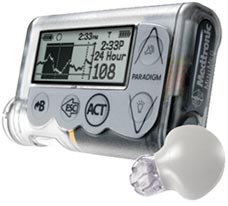
Since March 2011 I am a diabetic type 1. This means that my pancreas is no longer functioning and I have to take 4 insuline shots per day (Novorapid and Lantus (glargine)). In the past 6 month I have bought a Continued Glucose Monitor (CGM) produced by Medtronic. The CGM enables me to keep an almost real-time overview of the glucose in my blood. This is great for me, as I have a various activities (so glucose use varies) and I have a small child (now 1 year old) which makes me more aware of my child his safety. I use the CGM without an insulin pump, so I just use the monitor to keep me informed on possible hypoglycemics (low blood sugar with a risk of getting in coma when too low).
The CGM has greatly improved my ease of mind. But, as a mobile learning adapt, I feel the CGM could be improved with some simple technical and training modifications. So this blogpost is in a way a call for action from Medtronic and all CGM building companies. And the model can in itself be used as a generic mobile health (mHealth) model. How, easy in 5 steps
- The CGM is currently sending glucose information to a Medtronic monitor, but it would be an improvement if it would send information to a smartphone (BYOD type of development). Security might be an issue, but the CGM monitor has been hacked also, so well. Getting your blood sample info to an iPhone is already possible (see movie below), so getting CGM info to my/any smartphone is feasible.
- Now add to this a carbohydrate smart scale that is connected to my smartphone or other mobile device (e.g. the wireless scale in combination with iPad/iPhone). This does require a scale that has options to choose from: buttons for different carbohydrate foods and fruits to allow the scale to immediately convert the weight into the right amount of carbohydrates. This way, the mobile device can calculate the amount of insulin you will need and add the meal information to a offline/online synchronized personal database.
- When the CGM sends encrypted information to a smartphone as mentioned above, additional health applications can be build. For instance one that keeps you up to date on how your glucose is changing throughout the day in relation to your food intake. For instance, which foods allow you to do a more strenuous workout, or are better at keeping your glucose stable when doing nothing (airplane, daylong meeting,etc). For this an algorithm must be build that monitors different variables and can indicate what type of food gave good results overtime (in my case brown pasta is always giving me problems, so I would love to know if it is linked to anything else). Of course there are many diabetes related apps out there already: Android based, iPhone based, other, or check out this one EndoGoddess which seems to give points for putting in your diabetes info an in exchange you can download iTunes music - interesting business support model. But these apps miss the personalized, more semantic type of algorithm.
- Add to this a training application to inform diabetic newbies: YouTube movies, cause and effect information, food advice, workout advice (e.g. eating olives and avocado's helps in increasing good cholesterol levels because they influence the take in of bad cholesterol in favor of the good one).
- And finally, provide a newsletter URL or RSS feed that is mobile enabled. It is easy and promotes all that deliver information, so win-win situation.
- It saves time in putting the information of weighing food into any paper notebook or smartphone app, because the scale is connected to the smartphone.
- I can work with the device I like to use and am comfortable with
- It saves time in calculating, as the smartphone can immediately calculate how much insuline you need for the amount of carbohydrates you have weight in relationship to the time of day.
- And it saves quality time as I learn continuously (or when I am willing).
For sure Medtronic is amazing at leading research to a fully closed, artificial pancreas. See for instance their latest news on the path towards an artificial pancreas in their newsroom article here.
Thanks to Domingo Liotta I am also a bit at ease about my night insulin that is glargine (which has said to increase the cancer risk), but now three new study is out indicating that glargine would not increase the cancer risk (let's hope so, for long-term studies are still running).
And last but not least the linkup between blood level updates and iPhone.
Thursday, 2 February 2012
Noam Chomsky on the purpose of #education via #LWF
Noam's ideas on education in short (and paraphrased by me at times):
There is a constant struggle between two realities: the principles of the enlightment and indoctrination.
From the enlightement: the highest goal is the quest for knowledge. For this the learner is going to achieve that quest, it is her/his responsibility.
Indoctrination: young people are placed in a framework and they are molded to what is to be expected.
These two sides are always there. Do you learn for a test or are you learning for creative inquiry? There are always two different ways to look at things from kindergarden al the way through graduate and beyond...
Technology is a neutral instrument, education is a framework
Currently there is a substantial growth in technology, culture... but we should bare in mind that the technological changes that are happening are not that impressive as we think at times. The technology of the past century were impressive as they influenced life expectancy, health..., but the shift from a type writer to a computer, is in no way in comparison to the changes taking place a century ago.
Technology is a neutral instrument, also for education. So for any technology we should always look at the framework where in the instrument is used: what is significant, what is to be pursued... If you do not have a framework, the internet will not lead to significant enlightenment. So behind any significant use of technology, there needs to be a well constructed apparatus.
What does society want its citizens to be?
Do we want a society of free, critical thinking people? Education is a value on itself, because it can help to build better human beings.
Assessment versus autonomy
Increasing demand to take tests to follow personal evolution. But tests never tell you very much on the real insights, the real personal progress that is made. Sometimes tests are just a couple of hurdles, nothing essential. Teaching out to be inspiring, and motivating students to explore on their own (remark of myself: this is a close link to buddhist, ancient greec and jewish learning tradition). The questions and the discussions are important.
Personal thoughts after hearing the talk
But the thing I wonder about is, how can you build a critical thinking framework and ... even if such a framework is provided, who is to say how 'critical' is defined? Or is critical only defined as non-conform? No matter what we teach our children, I have the feeling that in the beginning, when they are young they want a better world for all of us, but as the realities of society is getting to them - to us - many of us turn bitter, or we turn away from the concept that human society can indeed become peaceful, compassionate and nurturing. I wish enlightenment was possible, but power and establishment seems to be getting in the way. Sometimes I even wonder whether research is not just another way to keep intellectuals outside of society, and give them a bone to chew on so they will not stir up things for the happy few. Why cannot science be the establishment? We know so much to bring about a cooperative world, yet violence is still all around us despite of different educational approaches and new technologies...
Thursday, 2 September 2010
Big Question: How to use Text-to-Speech in eLearning and when

In the Big Question launched by Tony Karrer this month, he wonders how we use Text-to-Speech (TTS) in our courses? He also reflects on budget and the combination of TTS and the text that can be shown, but I will only look at when and how I have been using TTS.
Tony Karer and Joel Harband (from Tuval software) got together and wrote up three posts on embedding Text-To-Speech in your eLearning courses. If you have not used TTS in your courses yet, have a look. If you have gone through these three posts, you really know how to embed TTS in your eLearning courses (e.g. integrate them into Articulate or Lectora, use them in Adobe Captivate...). The three posts focused on different angles of TTS:
- Text-to-Speech Overview and NLP Quality: this post focuses on what TTS is and what the quality of the voices are when using these technologies (how natural do they sound?)
- The following TTS post focused on the Digital Signal Processor (yes, for you techy audio people out there)
- And in his last post, Tony and Joel look at how TTS can be embedded in eLearning authoring software.
But Tony's Big Question of this month is: when do you use TTS in your courses? Or when do you use it to keep up with some learning activities yourself?
When the audio is only a dry representation of the content => TTS fits
Of course, what do I call 'dry content'? And can you - as a trusted eLearning developer - allow yourself to distribute dry content? Preferably not, but sometimes, content is not that flashy and in these cases TTS might cut audio cost. But you would not want your learners to listen to lengthy TTS audiofiles anyway, any learning should be delivered bytesize, certainly when the topic is dry in itself.
Delivering an audio file for those who want to, goes quickly with TTS. TTS can greatly benefit all your learners that are vision impaired in any way, but also people that are learning in an environment that is not favorable to reading (a bumpy bus ride, while driving a car, learning at night while driving along with your co-worker, at night with power cut...). Or simply to indulge those learners that have a better audio memory than reading memory. So, if you address a variety of learners and you want to offer them an audio file, TTS can really make it easy (and cheap) to do this.
I use TTS for a variety of reasons, sometimes for professional reasons, sometimes personal.
Personal use: I use OdioGo (which is a TTS from RSS feeds to podcasts) to turn my blogposts into audio files, by linking them to iTunes, all my posts are easily downloaded as podcasts. So if anyone wants to listen to it, they can.
Professionally I do use it, but with a limitation. With two limitations actually (very small audio studio is one I will not go into). When the content is dry, a TTS works fine, but when the content is sensitive or in need for nuance, I tend to go for a voice over.
The real voice is preferred to get closer to the real learning context. To enhance our animations we sometimes use real voices
In the past I have used voice overs for animation, for instance with the moviestorm software (an animation software), I put my voice over it. This was also done with other eLearning movies that were based on animations (Spanish example below, the second half of the 2 min video features the animation).
Why did we go for voice over of a real person? It was a matter of keeping the quality of the voice in relation to the content. For many TTS softwares do not always sync to the feel of a text, and the same phrase voiced with different intonation can really alter the message of a sentence. For instance, if you want to sound ironic, you will use a basic sentence (e.g. Do you?), and only add an extra intonation to give it the ironical edge.
Adding a real voice, can sometimes also add to the cultural background and fit the learning relationships of certain cultures. For example in some parts of Africa the grandmother knows her medicine, which means that if you are ill, you go to grandma to get cured. So when we prepare a course to increase medical awareness, we tend to add a real African older woman's voice to the course. This way it also feels more relevant and truthful from a cultural perspective.
It is the same with gps-voices. These are all smooth, clean voices, but that does not add to their credibility. But when a GPS has a 'dialect' voice that fits a certain area (e.g. a Texan voice), it immediately comes closer to the heart of some people.
In short: for very dry material, I would go for TTS and give it as an option to learners that prefer to learn via audio. But for more sensitive and context related content, I still prefer voice-over to add a more human feel to a course.
Sunday, 27 June 2010
What to take into account when chosing a mobile device for learning?

Choosing the best phone for mobile learning can be quite a challenge. It also depends on what you want to do with it and how easy you can get used to technology. The amount of features you want to use will also allow you to purchase a low or high cost smartphone or mobile device.
Let's say you want to explore mobile learning, these are some of your options.
First of all if you are a tech savvy person you could go for a less expensive device which has all the options of the iPhone and more, for the iPhone costs a lot, yet is similar to many other mobile phones that are cheaper. The iPhone is above all an incredibly easy phone to use (very intuitive in its user interface), so for those not that comfortable with technology, the iPhone is the way to go (although it is expensive). If you do not want to pay the cost of an iPhone, you can also go for an iPod Touch, which is much cheaper and offers all the iPhone options, except phone possibilities (but the phone possibilities are not essential for mobile learning).
The same is true for PDA's, with these types of mobile devices you have a range of possibilities, but not the phone possibilities, this again decreases the cost. You can also simply use a MP3 player, as these will enable you to share audio material (e.g. language learning or gather all the songs of birds in the wood and determine which bird it is...)
What can you opt for in a high-end phone or mobile device?
When deciding on a phone, it is good to know what features are most important to you and what type of mLearning you are envisioning, e.g. if you want to use location data to tag your pictures for field trips or similar, GPS will be necessary.
Depending on these features you can make a selection of phones and then compare them in one of the review sites (or a couple of review sites, sometimes those sites already have a 'best off' list: http://reviews.cnet.com/best-cell-phones/ , or a funny geeky one: http://www.testfreaks.co.uk/mobile-phones/ ). In any case it is good to look at which devices are on your local market and then look at (and compare) the specifications of your short list of mobile devices you want to choose from. Go for sites that offer both expert reviews AND peer reviews, because it is the user that is important, not the geek.
Personal criteria that might influence your mobile device purchase (basically what you do is check what you feel is important to you, the more possibilities, the more your device will cost - most of the time):
Camera quality: how many mega pixels does the camera have (the more mega pixels the better the quality of the pictures taken with it)? this was critical too me, as I like to record high quality movies and pictures for later recall (visual person)
Memory extension: if you use a lot of big files (movies, audio, podcasts...) it is a good thing to look at phones that have a memory slot (most of the time it is for mini SDcards), this offers you the chance to have access to more files.
Wifi possibility: if in doubt, I would certainly go for wifi enabled phones: wifi enables you to connect to free internet, which will save you a bundle especially when being abroad.
Bluetooth: this might be interesting if you want to connect to other devices without using a USB connectivity cable. It is also handy for health check-ups, they use bluetooth for instance for wireless interaction between a blood pressure meter and the software to analyse diabetes.
Phone capabilities and specifically quad band connectivity: only important if you travel internationally, because if you only have access to - say 2 - phone frequencies, you will likely not be able to access in some continents.
Mail access: is there a possibility to exchange between your mailbox and the mobile? Or is it of interest to you? If yes, look for that specification.
In addition to that one: synchronisation with outlook: only necessary if you work with outlook, this enables you to exchange mail and your contacts between your desktop and mobile phone.
Office possibilities: this enables you to look at office documents (depends again on your need).
Social media widgets: does the device offer easy to install social media widgets (e.g. facebook, flickr, twitter...). Having this function will enable you to quickly personalize your phone to your own social network.
GPS: that is increasingly important for geo-located learning as well, in those cases the GPS will know where you are at and offer you nearby information (shopping malls, geek stores, museums... linked to your location). But of course also easy to find your way around unknown territory.
Applications - can you add software that is build for your mobile phone, to your mobile phone? To me, being able to add extra applications to a phone is very important, as applications offer a wide variety of possibilities not necessarily integrated in the basic features of a phone (e.g. speech to txt, keeping track of your walks, comparing prices of products across various supermarkets and looking for the cheapest product in range, recognizing buildings...)
Touch screen or not: again this is very personal, some like touch screens, others do not (with touch screen you cannot write a quick sms blindly or from the pocket of your pants for instance, but on the other hand it offers immediate contact with what you see).
Screen reflection: if you want to use your phone outside regularly, it is a good thing to check readability of the screen when you are outside, standing in the sun.
Battery life (thanks to Nick Short!): this is pretty important if working away from a power source for example on a field trip.
Now with all these above mentioned features, it is clear that they are only interesting if you really want to explore them, otherwise it is better to buy a simple 'intermediate' smartphone which offers access to internet, phone capabilities and basic note taking (and the price is much lower than high-end phones). With these 'simple' phones you can already exchange pictures, movies, and discuss what these audiovisual materials you gathered with peers. From a learning point of view, even the simplest phone can add to a learning process.
What mobile operating system to choose?
Let's say you go for the more high-end ones, at that moment the operating system of the phone becomes very important (apple mobile operating system, windows mobile operating system, android OS, Palm OS, Rim or Blackberry OS, Symbian OS (the last one is the Nokia operating system)). Of all the Operating systems, the blackberry is the most restricted one as it needs to be connected to a central Blackberry server (rectification thanks to mLearning-world.com (who work a lot with blackberry comment - see below: the Blackberry's do have third party software that allows synchronisation with e-mail without having to go through a BB server).
There is also the operating system to consider when buying a new phone. Btw: always buy a phone that is not the first generation (these have many childhood diseases), always go for a second or third generation of a phone (e.g. do not buy the first android phone, but buy the second version they put out).
Both iPhone, Windows Mobile and Android offer 'application market place', and for the android many of them are for free. For instance if some application would be useful, but does not exist yet, android offers an open SDK (= an open development kit, which is similar to easy building blocks to build mobile software that the mobile device can run). And - thank you to Jra! - the iPhone also has a SDK kit which is easier to use than the Android one (but the Android SDK is open source, so it is again what you like best as a user or developer).
Thursday, 17 June 2010
Rick Nielsen: making a podcast a learning experience - not just a listening experience at mLearncon

A gray haired, bearded man, taking time to be consize. This is a live blogpost, so please overlook any mistypes, short notes...What is a podcast: automated, time shifted, portable, media
the spoken word
From simple to more complex
first video was 1899, so build 111 years ago. Broadcasted word was introduced 125 years ago, the written word is about 4000 years ago, the spoken word was always around.
The broadcasted word was revolutional, because you could connect with people fare away from where you are/were.
Real stories capture attention, so do fiction stories. The well spoken word enters the theater of the mind. the human voice is a powerful learning tool.
Using natural voice: it's not about hired talent!, relax, from the diaphragm, you will be much easier to listen to, more genuine and believable, does anyone think that their voice sounds good when recorded.
Internet business mastery: Sterling and Jay: www.internetbusinessmastery.com (Inge check it, they have 96 episodes)
Podcast is like a conversation with friends: casual and relaxed, it is engaging, it is local (anyone can build it), global (you can broadcast it) and targeted (you can provide a content that is targeted, so your audience will be targeted).
Tell your story don't try to be someone else.
the podcasted word
You can listen anywhere (car, plane, train, walking, jogging, gym...), any time (day or night, today, tomorrow, next week) - so try to make your content relevant for now and later (evergreen subjects), it's on a device of your choosing (iPod, cell phone, dvd, cd, network, tv...), they ask - they receive: your audience subscribes (RSS), when you add new info they will know, its "pulled" to your audience automatically.
podcast essentials
podcast strategy: define your audience, clearly define podcast purpose, your audience will be able to more readily focus on your content. Intro (current events, just what is going on), feature segment (the main topic), outro (post listener action - PLA) - comment on your blog, sign up for email link, "ethical bribe".
episode structure: build on concepts from one episode to another, your audience will continue to grow in understanding as a result.
episode continuity: sequence it logically.
episode consistently: publish with a frequency, make your publishing schedule known to your audience, and then publish on time.
episode length: establish episode length (average 20 minutes, be consistent), publish to be listened to in one sitting, if your episodes are too long, your audience will not return, no PLA - bummer (they will not do the follow-up because they will be gone).
podcast format: there are 4 formats: choose a format that best meets audience needs: monologue (not as easy as it sounds), dialog - easier to produce, round-table - keep your voices in order (use people with different voices, different accents... to enable people to know the different personae), interview - audience loves these.
the podcast experience
Learning objectives: comprehension is usually not assessed as formally as in traditional eLearning, just another conversation in your day, the podcast medium is usually quite casual. Try to put reflection moments in it.
study aids and more.
attention: get their attention, when on the web, use good titles to pique curiosity, spread the word, publish on iTunes, talk it up through twitter and all the social bookmarking sites, frequent blogs posts too!
engagement: get audience feedback, involve your audience directly by mentioning comments on the air - give them a shout, playing 800 number comment, interact through twitter, fora, via teleseminar...
Relationship: create relationships
Influence: trust, cut through 'defenses', they will listen to you and take your advice, you can more easily change minds an ultimately behavior, your audience will listen, learn and contribute.
Wednesday, 16 June 2010
Richard Clark: mLearning on multiple devices: a practical guide at mLearnCon

Again blogging live, so excuse me for short sentences, mistypes...
A very intelligent and sharp minded man with glasses, with kind gestures to give energy to his words, mainly elaborating with iPhone examples.
He will talk about strategy if you want to make native, or near to native applications.
First: what role do these mobile phones play in your strategy? what is it aimed for? what do the other academics, organizations do? how do you support it? these things are set on a mini video with possible feedback (says Richard Clark) E.g. use the CellCast player (http://www.onpointdigital.com/products_cellcast.htm).
mLearning platforms: you could use mobile podcast to keep people up to date.
Turning up your web development skills, will enable you to prepare cross platform content for smartphones.
Key questions to ask: comfort level with technology, approach (direct instruction (not really great learning, dixit Richard, for mobile learning), performance support, gateway to existing), online versus offline (sync issues), range of devices (take into account the lowest version of the operating systems), fidelity to device conventions.
Learning objectives: each module should be linked to one particular learning activity. So taking the main objectives apart and paste them with different sub learning objects with relevant learning activities. A quick reminder of the overall linkage of all the learning objectives works enlightening and repetitive for learners.
interesting: instapaper (interesting online, offline page reader, for iPhone, iPod, iPad)
Apple: when launching the 4.0 version of the OS, apple launched a different developers agreement: for the OS4.0 you can ONLY use apple development software and developer tools. This is done so the adoption of Apple OS4.0 would not be held behind by 3rd party software, and also to keep the look and feel of Apple sofwares.
development options: front end - back end: common data, built-in viewer, common data, custom viewer. Cross-platform: lowest common denominator and no common denominator.
Webkit: apple, RIM (just bought a company which will make the new blackberry phones probably full webkit), google, Nokia, some of WebOS from Palm.
So if you use the Webkit for testing, it will be 85 to 95% cross platform: local database, html5...
Development options 2: html5 + javascript, html + graphics + javascript.
Tools: appcelerator (www.appcelerator.com) great analytics which is embedded in the framework, with lots of data on the use and access of your users) = logic in javascript + user interface in html or Rhomobile = logic in Ruby, programmatic UI in Ruby (I would go for the first one).
If you are going to build cross platform be sure not to get only into the logic of one OS more than another.
Testing: unit testing using javascript (with program for getting bugs out), simulator-based testing (with for instance EggPlant (testplant: www.testplant.com/) = automated test protocol, that will save an enormous amount of pain and time, remote device testing (perfecto mobile, inge look it up), manual testing versus VNC-based tools.
Or like it was mentioned in the mLearnCon program: Unlike e-Learning on the desktop, where a couple of platforms predominate (Windows and Mac OS X), mobile platforms come in many different forms with differing programming requirements and user interfaces. Unless a developer is going to go for a simplistic “lowest common denominator” approach, he or she will have to find a way to create, test, and maintain the same application on multiple platforms.
Tuesday, 15 June 2010
Tomi Ahonen: Mobile in Learning: lessons from around the world

First key speaker at mLearncon Tuesday 15 june 2010.
Tomi Ahonen comes in with a gray mob-reminding hat and starts with a joke on the age of a mobile learner based on sms-capacity.
What was his speech about: mobile phones are the most prevalent technology, ever. 4,6 billion people have a phone. There are more phone users, than there are people having access to running water (Inge thought: telecom companies in low resource areas might put some of their profits into running or clean water projects - if they are not already doing it).
More kids have their own personal cellphone, than they have their own personal books (Inge: sad fact... except if you think about the Kontax-project lead by Steve Vosloo which increases literacy in young adults by the use of cellphones). Sms is much faster than e-mail. 10% of youth feel perfectly relaxed with sending sms messages while having sex (UK research). Underground trolleys and buses use sms to buy tickets, paid parking with sms, tax return via sms in Estonia, Estonia will do the national election via sms, m-stamps for snail-mail (alphanumeric codes - in Germany - accessible 24 hours a day). 68% of teens said their favorite way to communicate via SMS. texting underneath the sleeve: teenagers give their old not connected phones. The future is not only mobile, it will be ubiquitous with various devices, but mobile will be the preferred device of youngsters. India has 90% coverage via WAP enabled phones. Ringtones are 5 billion dollar business, no other technology had use for ringtones => new businesses start up.

This creates a complete different generation, one that all previous generations can not imagine how it shapes the lives of contemporary young generations. Permanent connections and almost telepathic communications will reshape the world that we live it, that THEY will build.
When did mLearning start? In Japan in 2000. The first school implementation was in Singapore in 2001. Mobile exams first appeared (according to Tomi) was in New Zealand 2003. The first daycare mobile blog dates from 2006 in Finland. Mobile books take Japan since 2007. 58% of Kenya uses mobile banking for personal financial transactions. QRcodes and other mobile coupons for discount rates. Poland: free cooking advice from Knorr via mobile. AMF Ventures saw that mobile data is much more accurate in measuring data. Smirnoff bartender app. 5th most popular mobile category in Korea is Learning for user generated content (26%). Voice to voice translator apps. Mobile love detector (voice tension gives you love results). Game with "Mosquito Noises" in UK from MobHappy 2 december 2008 (by Fanta).
Great resource: forum Oxford forum: www.forumoxford.com (enrollkey forumoxford, I think, otherwise ask Tomi).
Mobile is the 7th mass media. But new media will not kill previous media, it only has new benefits, uses (look at the picture below). A nice mobile app: Carbon Diem to look at your carbon footprint.

Or from the program: Mobile is the most prevalent technology on the planet, exceeding TV by a factor of 3 to 1 and personal computers by 4 to 1. Being digital and interactive, mobile is well suited for uses in education. Called the seventh mass medium in the industrialized world, in the Emerging World mobile is often called the "first mass medium" and services such as internet access will be primarily from mobile phones, not PCs. This opening keynote presentation examines the consumer use of phones and the uses of mobile in education and learning. Case studies from different parts of the world will illustrate how the exponential growth of mobile technologies impacts the way we live, work, and learn.
Wednesday, 2 June 2010
Ethics, technology and learning
This last couple of days have drained my spirit, mainly because my ethics were challenged on different levels. I did not find the energy to write about it until today and it is with a sad heart that I reflect on why I have felt a bit in despair.Why do governments politicize education? (Becta in the
In
But a society is only as strong as its weakest link: get everyone educated in something they feel comfortable with to build a strong society.
Becta in the
Becta is the government agency leading the national drive to ensure the effective and innovative use of technology throughout learning. It got great results and – in my opinion – Becta single handedly got Britain into the 21st century teaching by taking all (well, many) of the teachers along the learning path into the knowledge era. They produced an amazing amount of publication, accessible to all and tackling technology/learning issues that matter to many of us.
But the government changed, and because of this Becta will be shutting down in November 2010, in spite of many good learning outcomes and products.
So why do governments politicize learning?
Why can the military achieve what civil society cannot
In the last weeks I had the pleasure of meeting people actively involved in training soldiers. I am against violence, and I do belief no one on earth, no country, should have a military, but e.g. civilian aid army. But I cannot deny that the military offers opportunities for some young adults that they would otherwise never have (but they also risk their lives). No matter what group of human society, it is always a group of humans with all their nice and less friendly characteristics.
While talking to the teachers and exchanging ideas I wondered how they managed to reach learners that society could not reach. For example: many young recruits do not master basic calculations and/or reading/writing skills. This means that society and its education missed the boat. It is true that this is a joint responsibility, schools, parents, government should work together to improve the overall state of human comprehension in our young people.
The strange thing is military does reach them, and some of these young adults actually learn content that they did not absorb before (although I assume they had the chance). So why is that? Is it because the military actually use learning techniques that attract these young adults? (e.g. some of them got a Nintendo DS to learn simple math skills. Why? All of the peers were using Nintendo DS to play games, so if anyone was using a Nintendo DS, the peers would think “ah, he or she is playing a game” – so not loosing face while actually learning to count.
Another thing was language: recruits got language training, okay basic, but still it worked and they were actually eager to learn more (at first only words were offered, but on demand of the recruits complete sentences were offered for learning).
With new technology they were also provided just-in-time first aid help lessons, with simulations they were trained for in-the-field situations….
Say results would show learning outcomes improve drastically with the use of simulations, games… (Which is proven for some digital learning activities), than why can’t the government invest more money in them to reach those hard to reach learners that the military actually reaches?
Why is it still about technology and not about learning?
All of us that depend on funding know that if you stick the latest technological hype into a funding proposal, linking it to learning in some way or another, you have a far bigger chance to get your proposal accepted. Currently European politicians linked to EU funding say: we should get more learning results from the learning projects that run/ran, what are the long-term results (if any)? And indeed learning results are what count, not the technology. But is learning today actually about learning, or is it just another economic reason to sell stuff to regions or people that sometimes simply do not have the budget to sustain these technical solutions once the funding stops?
What are we to do?
How can we all insure that no matter what, learning and human consideration will improve with any technology for learning we introduce? How can we put education on the foreground and not technology? How can we opt for long-term actions leaping across political boundaries instead of ‘look-at-what-I-did’ projects from short term leaders?